
Carriers (Paqueterías)
Browse every shipping carrier and its services from one tree list, then open a carrier to configure brand and operations, or open a service to configure costs, prices, and add-ons.
The Big Picture
Paqueterías (/carriers) is the control room for how Envia works with each logistics company. A carrier (FedEx, UPS, DHL) owns many services (Ground, Express). Prices, volumetric limits, pickup windows, and label formats all hang off that tree.
You work across three screens:
- The carriers list (
/carriers) — a tree table: one row per carrier, expandable rows for its services. - Carrier configuration (
/carriers/:id) — brand, services, volumetric limits, actions, print formats, tracking mapping, pickup rules. - Service configuration (
/carriers/:id/service/:service) — taxes, costs, price book, volumetric factor, default rates, additional services/charges, and additional/surcharge costs.
A sibling screen Carrier addresses (/carriers/addresses) manages pickup/address CSVs. It is not part of the configuration pills.
Legacy lists
/plansV2 and /plans still exist for flows that have not migrated. Day-to-day work uses Paqueterías (/carriers).
What You Can Do
- Browse carriers and nested services, filtered by country, carrier, international/national, shipment type, and status.
- Search by service id or carrier/service name.
- Open a carrier to edit brand (name, logo, color), volumetric limits, print formats, tracking mapping, and pickup rules.
- Open a service to edit costs, prices, add-ons, and additional costs.
- Assign catalog price plans to many companies from a CSV on this list (Bulk Custom Plans).
Finding Your Way Around
- In the main sidebar, open Paqueterías (
/carriers). - Use the locale filter (country) at the top of the app, then the table filters.
- Expand a carrier row to see its services.
- In Acciones, click Detalles:
- On a carrier row →
/carriers/:id - On a service row →
/carriers/:id/service/:service
- On a carrier row →
Carrier rows show active-service counts (active / total). Config pills on a row summarize volumetric factor, box/pallet weight, and pickup hours (carriers only).
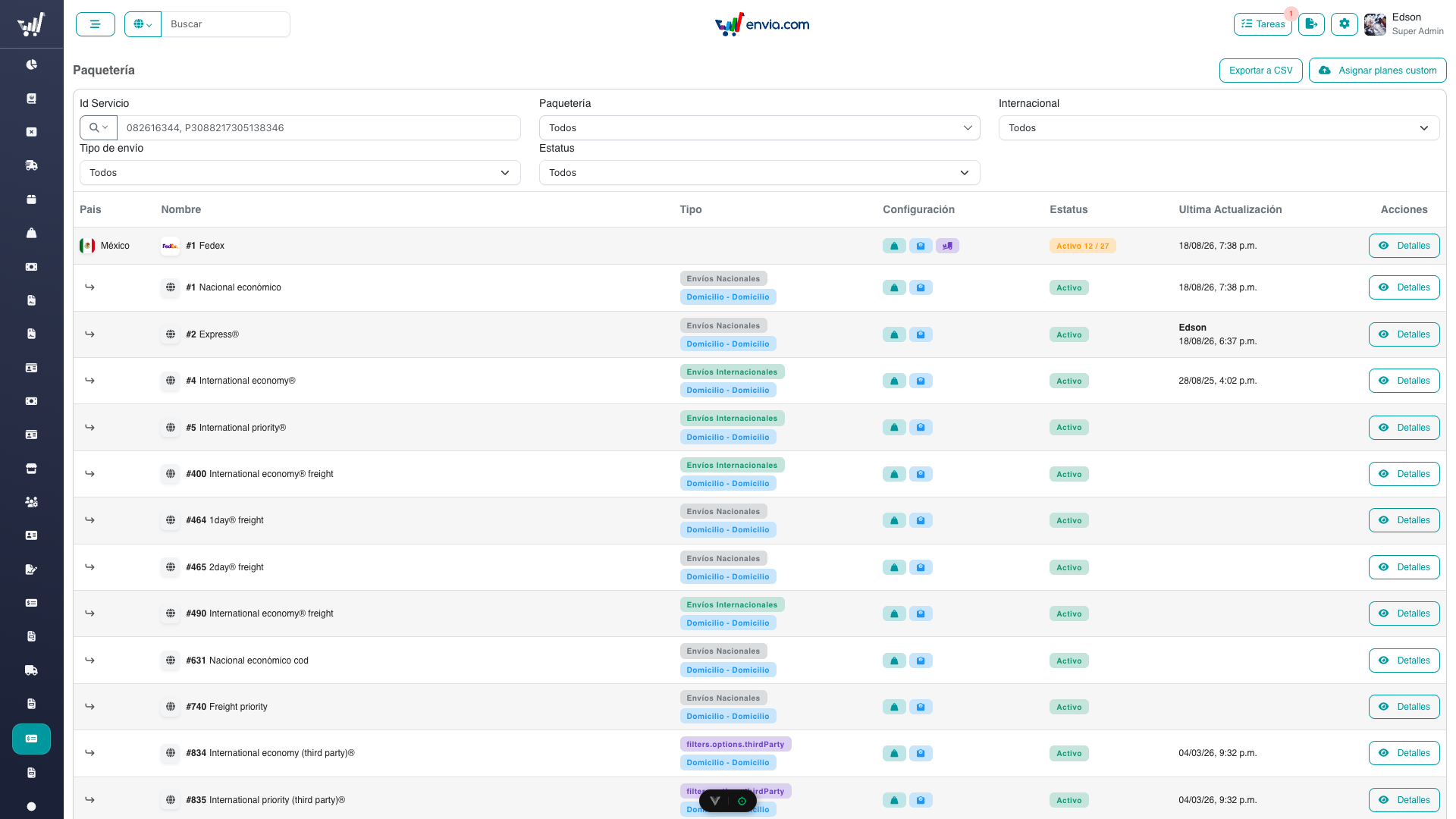
The Paqueterías list (/carriers): filters, nested services, configuration pills, and Detalles on each row. Asignar planes custom is on the page header.
Common Tasks
Finding a carrier or service
- Open
/carriers. - Search by Id Servicio or by name (FedEx, UPS, DHL).
- Narrow with:
- Paquetería — one or more carriers.
- Internacional — Internacionales, Nacionales, or Importación (service rows).
- Tipo de envío — Paquete, LTL, or FTL (service rows).
- Estatus — Activo or Inactivo.
- The table is a tree: carrier first, services indented underneath.
Opening configuration
- Carrier — Detalles on the carrier row, or open a service and use the breadcrumb back to the carrier.
- Service — Detalles on the service row, or from the Services section on the carrier page.
Assigning catalog plans in bulk
See Bulk Custom Plans. The Asignar planes custom button is on this list header and requires bulk-custom-plans.
Permissions
| Permission | Access |
|---|---|
services-menu | View the list and carrier detail (read) |
carriers-manage | Edit carrier volumetric limits, pickup, print formats, tracking mapping |
carriers-manage-brand | Edit carrier/service display name, logo, and brand color |
bulk-custom-plans | CSV bulk assign of catalog plans |
plans-menu | View service configuration sections (read) |
manage-service-costs | Edit operational costs and additional/surcharge costs |
manage-service-pricing | Edit the price book |
manage-service-config | Edit service volumetric factor, default rates, additional services and charges |
Related
- Carrier Configuration — brand, volumetric, print formats, tracking, pickup
- Service Configuration — costs, prices, add-ons
- Bulk Custom Plans — assign catalog plans from CSV
- Glossary — terms used in this section
- Client Carrier Activation — restrict carriers for one client
- Technical Documentation — architecture and API